We should all be aware by now that if you are one of the few of us that actually played by the rules (to a certain extent) and actually have a legit Iphone through AT&T in the US, Swirly MMS will not work and your sim chip will not allow you to send MMS from any phone you put it in! This is because AT&T blocks this feature in their system by using a profiler that runs every night to disable MMS if you have the iphone plan! This is rediculous and I think AT&T should at least here it from us. Even if you do not feel as strongly as I do, please take the time to let them know that what they are doing is not OK.
Contact AT&T
If anyone else feels as strongly as I do about how AT&T blocks mms on the iphone send a letter to corporate complaints, or email them:
at&t
5020 Ash Grove Road
Springfield, IL 62711
or go here AT&T Corp Comments
I sent them a comment on the corporate site above and got a phone call back from a corporate complaints rep. I have attached the message I sent below. BTW she basically told me it was impossible if the iphone plan was on my line because the profiler runs and night and changes it back.
Sent this to AT&T, Maybe if they get enough complaints they will actually listen!
I am writing to complain about something that AT&T is blocking on Iphone users. I currently have an Iphone 3G on my family plan with unlimited messaging. I also have another phone that I would like to use from time to time in order to send and receive Multimedia Messages (a feature included on the family texting plan i pay for). I was very upset to learn that the MMS feature is blocked on my line because I have an Iphone, regardless of whether I pay for it or not. This is a major issue because your website clearly states “With just one package - ALL lines in your FamilyTalk group can send and receive UNLIMITED text, picture, video and instant messages with anyone in the US.” I was on the phone with a customer service representative for 45 minutes who was oblivious to the fact that AT&T blocks this before she realized that this is common practice for iphone lines. Once she was told by a supervisor, she relayed the message that there was nothing she could do. I asked to speak with the supervisor which took another half hour to get on the line to speak with me. The supervisor was not helpful, I told her what your website states and she told me not for the Iphone because it doesn’t support it. I told her that I am paying for a feature that AT&T is deliberately blocking and I demand the restriction be lifted and she refused. I am a loyal customer to AT&T and have been for over 10 years and I simply cannot figure out what the reason is for this restriction. Something as simple as lifting a restriction can make your customer happy and after an an hour and a half on the line with AT&T support, they refused to unblock a service I pay for. AT&T does not block this service on any other phone, regardless of whether or not it supports MMS and to block something that I pay for is preposterous . Especially after asking a supervisor to lift this restriction. Please feel free to call me with any questions you may have or for more information regarding my issue.
Thursday, September 25, 2008

Tuesday, September 23, 2008
Sekai Camera New App in development for Iphone!!

Everyone needs to check this out. The concept is sweet!
http://www.techcrunch.com/2008/09/17/tonchidot-madness-the-video/#comments
There site is
Monday, June 23, 2008
thingfling.com
Every morning I wake up and browse through a bunch of one deal a day sites (ex: woot.com) and I just came across a new one that is pretty cool. www.thingfling.com basically the same idea as woot. They ship real quick and they have some cool stuff. They also do the random crap like woot does but we can actually buy it without their server crashing (for now). My last $10 random crap purchase from them came with 20 earbud style headphones, a usb a to b cable with LED's and a Linksys cordless standard/VOIP Phone!. The phone is both a standard DECT cordless phone, and also works with VOIP. www.thingfling.com, It's a pretty cool site to add to your list of places to checkout :)
Friday, March 28, 2008
The application indesign has unexpectedly quit c3 running leopard
OK, so I haven't posted anything on my blog in a looooong time but this problem was so annoying and I couldn't find a fix anywhere. I got my girlfriend a new computer for her birthday and from day one Indesign CS3 wouldn't load, I kept getting "The application indesign unexpectedly quit". I went through all the recommendation of deleting the adobe indesign folder from the user library/preferences folder with no luck, checked for updates etc. I created a new user and indesign worked fine. Sure I could have had her log in with a new user account but she just customized her profile to her liking and I really wanted to figure it out without having to inconvenience her. I ended up fixing it by changing the permissions recursively on the indesign folder in applications. Easiest way to do it would be to highlight the folder and hold the apple key and push the letter i on your keyboard. This will bring up the information for that folder. In my case, the permissions were set correctly so I simply gave system and admin read/write permission and user read permission. I also made sure to click on the little gear under the permissions and apply it to enclosed items, this is the same as writing it recursively. Another way of doing this would be to launch the terminal and give the following command
sudo chmod -R 775 /Applications/Adobe\ InDesign\ CS3
sudo chmod -R 775 /Applications/Adobe\ InDesign\ CS3
Tuesday, September 25, 2007
YouTube Fix for unlocked iphones (cannot connect to youtube)
Step 1
Download this zip, and unzip it somewhere.
Step 2
Get your activated iPhone ready, and connect to it via SCP or SFTP or whatever you have that lets you access the file system.
Tip: iNdependence is a wonderful program for the Mac that can install SFTP in one click. I recommend this, and Transmit to connect to the SFTP on the iPhone (remember, user “root”, password “dottie”.)
Step 3
Navigate to /var/root/Library/Lockdown on the phone, and upload those three files you unzipped. Overwrite the stuff on the phone.
Tip: Paranoiacs always back up.
Step 4
Navigate to /var/root/Library/Lockdown/activation_records. See that long numbered plist file that looks like “88921140141031443517.plist” or something? The name varies, but you’ll see it. Open it up in your favourite text editor.
Step 5
Find this bit.

Select what I have selected there.. the bit under DeviceCertificate.
Step 6
Replace that bit with the following:
<data>
   LS0tLS1CRUdJTiBDRVJUSUZJQ0FURS0tLS0tCk1JSURQekNDQXFpZ0F3SUJBZ0lLQTRC
   UllCOVBRUms3NlRBTkJna3Foa2lHOXcwQkFRc0ZBREJhTVFzd0NRWUQKVlFRR0V3SlZV
   ekVUTUJFR0ExVUVDaE1LUVhCd2JHVWdTVzVqTGpFVk1CTUdBMVVFQ3hNTVFYQndiR1Vn
   YVZCbwpiMjVsTVI4d0hRWURWUVFERXhaQmNIQnNaU0JwVUdodmJtVWdSR1YyYVdObElF
   TkJNQjRYRFRBM01EY3dOekl6Ck1EZ3dNMW9YRFRFd01EY3dOekl6TURnd00xb3dnWWN4
   TVRBdkJnTlZCQU1US0RNNE5URmhOamRqT0dFM01ETTMKTnpjek9HWXhOVEJsTTJGaFlU
   WTJOV1U1TkRFNU5tUXpOekV4Q3pBSkJnTlZCQVlUQWxWVE1Rc3dDUVlEVlFRSQpFd0pE
   UVRFU01CQUdBMVVFQnhNSlEzVndaWEowYVc1dk1STXdFUVlEVlFRS0V3cEJjSEJzWlNC
   SmJtTXVNUTh3CkRRWURWUVFMRXdacFVHaHZibVV3Z1o4d0RRWUpLb1pJaHZjTkFRRUJC
   UUFEZ1kwQU1JR0pBb0dCQU9XTEIxejYKMEI0M0l3SVRudFFNS0JacW51YmkxSjR4cnJO
   SmtvWC9GUmtjS1NoemQwZnBTRXplNi9ZcTE2ZDVjaTg1dUt0agpUSnRHRFpjcTltaFlt
   TWc2anZUelB4b3g1Z09ib0h1NGFVeGNlZ2NHUDhtRFpUcjdPM21rZU1rV0RRVkd2Z3NL
   CkwwdWE0WGJZVXdiYnB6aFJTN041aWZERXJSWUt3UlljWXovVkFnTUJBQUdqZ2Qwd2dk
   b3dnWUlHQTFVZEl3UjcKTUhtQUZMTCtJU05FaHBWcWVkV0JKbzV6RU5pblRJNTBvVjZr
   WERCYU1Rc3dDUVlEVlFRR0V3SlZVekVUTUJFRwpBMVVFQ2hNS1FYQndiR1VnU1c1akxq
   RVZNQk1HQTFVRUN4TU1RWEJ3YkdVZ2FWQm9iMjVsTVI4d0hRWURWUVFECkV4WkJjSEJz
   WlNCcFVHaHZibVVnUkdWMmFXTmxJRU5CZ2dFQk1CMEdBMVVkRGdRV0JCVHBsVTJrZE5z
   eFpFbmEKTXFUSnVaVWdaQzM1WHpBTUJnTlZIUk1CQWY4RUFqQUFNQTRHQTFVZER3RUIv
   d1FFQXdJRm9EQVdCZ05WSFNVQgpBZjhFRERBS0JnZ3JCZ0VGQlFjREFUQU5CZ2txaGtp
   Rzl3MEJBUXNGQUFPQmdRQ3FjbVNyTnFnWldGdkZJYzluCkNwMktacUVRK0ozdTNLS2h4
   ZUwzR05KZ2twS3JQa3R3RC8rRGhIMlFDRUNtRUNMNTI0MHVLWGkvTzFlZjZZMkIKWjM4
   SVFuOHVoci9oYkRXUWFpV1o2OFhQWUEvTzRFZ3lKMHp6cmlzMks3UzBPSG9vTm1uZVow
   cEVMMElib2ZaOApKRjhHbjRaK0I2dHR6MEtQSDdJWTJ3LzRYZz09Ci0tLS0tRU5EIENF
   UlRJRklDQVRFLS0tLS0K
</data>
Save the file back onto the phone. Just make that modification to the phone’s file, upload it to the phone.
Step 7
Reboot the iPhone — you’re done, and can watch Chocolate Rain ten times a day.
props to SuitCase, 3rd of September, 2007.
Wednesday, September 5, 2007
Apple Drops Iphone prices by $200

That's right. Apple has dropped the prices of brand new (not refurbished) Iphones by $200, bring the 8gb to $399 and the 4gb to $299. Apple also introduced a new line of Ipod's including the Ipod Touch (pictured above) that's basically and Iphone without the phone piece.
Wednesday, August 29, 2007
IPHONE UNLOCKED!!!
New Jersey teen unlocks Apple iPhone, uses on T-Mobile network
Friday, August 24, 2007 - 02:03 PM EDT
"A teenager in New Jersey has broken the lock that ties Apple's iPhone to AT&T's wireless network, freeing the most hyped cell phone ever for use on the networks of other carriers, including overseas ones," The Associated Press reports.
"The New Jersey teen collaborated online with four other people to develop the unlocking process," AP reports.
"George Hotz, 17, confirmed Friday that he had unlocked an iPhone and was using it on T-Mobile's network, the only major U.S. carrier apart from San Antonio-based AT&T that is compatible with the iPhone's cellular technology," AP reports.
"The hack, which Hotz posted Thursday to his blog, is complicated and requires skill with both soldering and software. It takes about two hours to perform," AP reports.
[Thanks to MacDailyNews Reader "Ryan" for the heads up.]
Buy it here
Read his blog Here!
Checkout his videos on youtube too! George Hotz is the man!
Friday, August 24, 2007 - 02:03 PM EDT
"A teenager in New Jersey has broken the lock that ties Apple's iPhone to AT&T's wireless network, freeing the most hyped cell phone ever for use on the networks of other carriers, including overseas ones," The Associated Press reports.
"The New Jersey teen collaborated online with four other people to develop the unlocking process," AP reports.
"George Hotz, 17, confirmed Friday that he had unlocked an iPhone and was using it on T-Mobile's network, the only major U.S. carrier apart from San Antonio-based AT&T that is compatible with the iPhone's cellular technology," AP reports.
"The hack, which Hotz posted Thursday to his blog, is complicated and requires skill with both soldering and software. It takes about two hours to perform," AP reports.
[Thanks to MacDailyNews Reader "Ryan" for the heads up.]
Buy it here
Read his blog Here!
Checkout his videos on youtube too! George Hotz is the man!
Friday, July 27, 2007
Apply custom ringtones to your Iphone (OS X only)
I came across an awesome application called Ifuntastic that allows you to use music files you crop as ringtones. I used garageband to crop some mp3's and exported them as m4a files. The program does work perfectly, however you have to follow the directions each step of the way. The app will seem like it crashes during the process, but be patient, go make a sandwich or something and it'll get the job done soon enough. There are some cautions as with any app, such as auto sync will stop working and you will have to manually sync w/ itune, but it didn't happen to me. I got the app off of demonoid but it is also available HERE!
Hope some of you find this useful!
UPDATE: New version 2.0 is HERE
Hope some of you find this useful!
UPDATE: New version 2.0 is HERE
Thursday, July 5, 2007
Explore neighborhoods at street level–virtually
Google Maps has an awesome new feature called Street View. To use it simply zoom out so the entire U.S. map is visible and click the Street View button. This feature is only available in a few cities for now, I can't wait for Cleveland!
Streetview Sitings!http://streetviewgallery.corank.com/
Check out the video tutorial!
Microsoft's version: http://preview.local.live.com/ Not as easy to use in my opinion.
| Use Street View to: | |
 | View street level photographs (select cities) |
 | Take virtual walks; pan, rotate and zoom |
 | Explore cityscapes, landmarks, points of interest |
 | Find shops, restaurants, parks, hotels and more |
Tuesday, June 26, 2007

Wednesday, April 25, 2007

Hi, this site is all about ninjas, REAL NINJAS. This site is awesome. My name is Robert and I can't stop thinking about ninjas. These guys are cool; and by cool, I mean totally sweet.
Facts:
1. Ninjas are mammals.
2. Ninjas fight ALL the time.
3. The purpose of the ninja is to flip out and kill people.
HAHA LMFAO
Thursday, January 11, 2007
Verizon is trying to stop the t-shirt sales!!
Yes, Verizon has sent an E-mail to BlueFishTshirts.com threatening a lawsuit for copyright infringement! Checkout the Digg posting and don't forget to Digg this and help make Verizon look worse then they already do. Seems like a stupid move in my opinion, VerizonMath was beginning to fade away. Next thing you know, Verizon gives it CPR and now it will be back and more popular than ever!
Tuesday, January 9, 2007
Apple IPhone to be released in June!

All the rumors ended up being true. Apple has created a phone that will be available for Cingular customers called the IPhone. Don't know how they were able to use the name since Linksys already has an IPhone, but Apple has good lawyers. Anyways, the phone itself looks great and perhaps the best feature that other might overlook is the multi-input touchscreen. This senses when two fingers are touching the screen and allows you to resize images by simply moving your fingers apart or together. Checkout www.apple.com to get more information about the IPhone.
Thursday, January 4, 2007
Check out my error message in the Feb. issue of Win IT Pro
 That's right, the error I posted earlier in this blog will be showcased in the February issue of Win IT Pro! If you have any send them to rumors@winitpro.com.
Monday, January 1, 2007

Friday, December 29, 2006
It's not a "Southern thang" anymore
 Finding a great place to get away from work for an hour can be more difficult than it seems. We learned that the hard way. For us, Town Fryer was a rare find that offered a great place for out of the ordinary food and a fun time. Friday lunch at the Fryer became our lunch tradition. Unfortunately it was short lived once we found out the Fryer will be closing. Clevelanders who have had the opportunity to eat there will be losing more then just a restaurant, they're losing a great time in a fun and welcoming environment. It will not be easy to find a replacement for the Fryer, we will miss you :(
If you haven't had a chance to experience The Town Fryer, visit http://www.thetownfryer.com/ and stop in before they close for good.
Thursday, December 28, 2006
Windows Vista. . . It's nice!
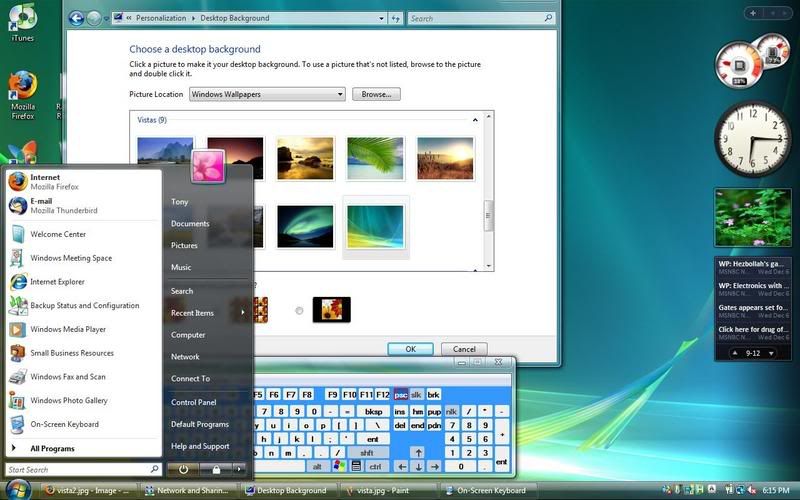
The RTM version of Windows Vista was released to business users about a month ago and I had high hopes. I've always liked exploring different operating systems, and in the past few years I've found at least a few things I've really liked in most. When I saw the first build of Vista, I knew that this OS would be huge. I write this post under Vista Business Edition running on my Mac and the look and feel of the OS is just as appealing as the hardware it's running on !(MacBook) Since the release of OS X, Macintosh had the eye candy that Windows lacked. Apple became more of a style than anything, and the Ipod was the perfect companion. It looks like Microsoft is finally catching up with their latest operating system. If your hardware supports it, Vista's Aero Glass gives your windows theme a transparent look,(shown in screen shot above) and the start menu has a sort of Gnome look to it. Many Mac fanatics will argue that Vista is a carbon copy of OS X. I do admit the argument can be made, but my rebuttal would be that Mac stole ideas from Xerox from the beginning. In my personal opinion, if every OS stole what's good in another, users like us win.
In a nutshell:
Vista looks and runs nice even if they stole from Apple. Let's hope they market it better then the Zune.
It will get bombarded with hack attempts to highlight any security holes hackers might find, but Windows users are used to the patch your OS everyday thing anyways.
Asia scrambles to restore communications after quake
Hate to always link to articles but it's hard to find time to add content to this blog, here's the article!
Converting DVD movies for the iPod using Mac OSX

Found a very nice piece of software called Handbrake that allows you to convert a dvd to Ipod format. Handbrake is completely free and can be downloaded here
Anders.com has a full tutorial for both Mac and Windows users!
Wednesday, December 27, 2006

Subscribe to:
Posts (Atom)